
You can pass the AWS Cloud Practitioner exam (CLF-C02) in 30 days studying about one hour a day, even with a full-time job and zero cloud experience. The trick isn’t more hours — it’s studying the four exam domains in the right order, taking two full practice tests before exam day, and drilling the roughly 60 core concepts that repeat across every version of the test.
That’s the short version. This AWS Cloud Practitioner exam 30-day study plan breaks those 30 days into four weekly phases, prioritizes free resources over paid ones, and includes the “whiteboard test” I used to check whether I actually understood a concept instead of just recognizing it on a flashcard.
What is the AWS Cloud Practitioner exam, exactly?
The AWS Cloud Practitioner (CLF-C02) is Amazon’s entry-level cloud certification. It’s a 65-question multiple-choice exam, 90 minutes, scored out of 1,000 with a passing score of 700. It doesn’t test whether you can build anything in AWS — it tests whether you can talk about the cloud fluently: what the services do, how billing works, and who is responsible for security. Think of it as a vocabulary and concepts exam, which is exactly why 30 days is enough if you structure it well.
How should you split 30 days of studying?
Four weekly phases, roughly one hour per weekday with longer sessions on weekends. Total commitment is around 40 hours. Here’s the shape of the plan:
Week 1 (Days 1–7): Cloud concepts and the big picture. Learn what cloud computing actually is — the six advantages of cloud, deployment models (public, private, hybrid), and the shared responsibility model. These are the foundation everything else builds on.
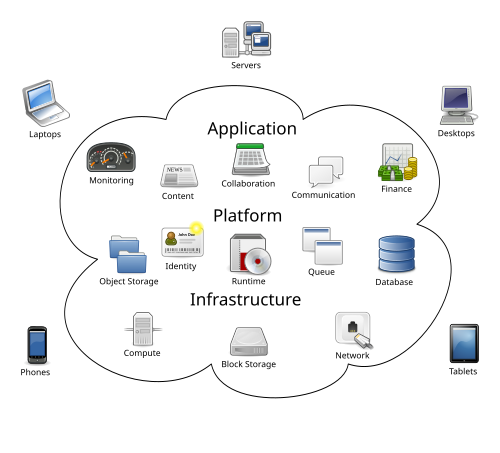
Week 2 (Days 8–14): Core AWS services. This is the biggest domain on the exam. Learn the “one-liner” for every major service: EC2 is virtual servers, S3 is object storage, RDS is managed databases, Lambda is serverless functions, VPC is your private network. Don’t memorize parameters — memorize what each service is for.
Week 3 (Days 15–21): Billing, pricing, and support. Learn the pricing models (On-Demand, Reserved, Spot), the AWS Pricing Calculator, billing alerts, and the support plans. This domain is small but heavily tested, and it’s where most beginners lose easy points.
Week 4 (Days 22–30): Security, then practice exams. Cover IAM, the shared responsibility model in depth, and compliance basics. Then take two full 65-question practice exams under timed conditions and spend your remaining days drilling only what you got wrong.
Notice the order: concepts first, services second, billing third, security last. Security questions make much more sense once you already know what IAM policies attach to.
Which free resources should you actually use?
You don’t need to spend a dollar. The free tier of preparation materials for this exam is genuinely excellent: AWS Skill Builder’s free “AWS Cloud Practitioner Essentials” course (watch at 1.5x speed during week 1), the official AWS whitepapers (the exam quotes the Well-Architected Framework and shared responsibility model pages directly), free practice questions from ExamTopics or TutorialsDojo’s free samples (save full practice tests for week 4), and 20 minutes clicking around the AWS Free Tier console — creating an S3 bucket once teaches more than reading about S3 for an hour.
Paid courses help, but the exam is simple enough that the free materials cover everything — spending money doesn’t buy knowledge you can’t get for free, just structure. This plan is the structure.
The whiteboard test: my one original study trick
Here’s the mini-test that made the difference for me. After studying any service, close your notes and say out loud — as if explaining to a coworker — what the service does and when you’d use it instead of its closest alternative. Not “EC2 is Elastic Compute Cloud.” That’s a label, not understanding. The real answer sounds like: “EC2 gives you virtual servers you fully control; you’d pick it over Lambda when you need a long-running process or custom OS-level configuration.”
If you can’t produce that sentence without notes, you don’t know the service yet — no matter how many flashcards you got right. Recognition is cheap; the exam rewards the kind of understanding that lets you eliminate wrong answers confidently. I ran this whiteboard test every evening and kept a running list of the services I stumbled on. By day 25, the list was empty.
What do most people get wrong about this exam?
Two things. First, they over-study services and under-study billing. The billing and pricing domain is only about 12–18% of the exam, but it’s nearly free points: the pricing models are simple rules, and the questions are straightforward. Skipping it is like leaving money on the table.
Second, they memorize service names without learning the trade-offs. The exam loves “which service should you use when…” questions. For every service, learn its one competitor and the single sentence that separates them: S3 vs. EBS (object storage vs. block storage for one EC2 instance), RDS vs. DynamoDB (relational vs. NoSQL), CloudFront vs. a load balancer (global content delivery vs. distributing traffic across instances).
Your week-by-week checklist
- Week 1 — Foundations (Days 1–7): Watch AWS Cloud Practitioner Essentials on Skill Builder (free). Learn the 6 advantages of cloud and 3 deployment models. Master the shared responsibility model: AWS secures the cloud, you secure what’s in it. Whiteboard test: explain IaaS vs. PaaS vs. SaaS with one example each.
- Week 2 — Core services (Days 8–14): EC2, S3, RDS, Lambda, VPC, IAM, CloudFront, Route 53, CloudWatch — one-liner plus one alternative for each. Spend 20 minutes in the AWS console (free tier). Whiteboard test: every service from memory, no notes.
- Week 3 — Billing and pricing (Days 15–21): On-Demand vs. Reserved vs. Spot vs. Savings Plans — know the break-even logic. AWS Pricing Calculator, Cost Explorer, billing alerts. Support plans: Basic vs. Developer vs. Business vs. Enterprise (response times are tested). Whiteboard test: explain why a startup would pick Spot over On-Demand.
- Week 4 — Security and practice exams (Days 22–30): IAM users, groups, roles, policies; MFA; least privilege. Full 65-question practice exam #1 (timed, 90 minutes) — review every wrong answer. Full practice exam #2 — aim for 80%+ before booking. Final two days: drill only your missed concepts, then rest the night before.
FAQ
Is 30 days really enough to pass the AWS Cloud Practitioner exam?
Yes, for most people studying about an hour a day. The exam tests concepts and vocabulary, not hands-on engineering. People with some IT background often pass with two weeks; 30 days gives a true beginner comfortable margin, including time for two full practice exams.
Do I need AWS hands-on experience to pass?
No. The exam is conceptual. That said, 20 minutes clicking around the free-tier console makes abstract services concrete and is the highest-ROI study activity most beginners skip.
How much does the AWS Cloud Practitioner exam cost?
The exam fee is $100 USD. AWS occasionally offers 50%-off vouchers through its free training events, so check the AWS training calendar before you book.
What score do I need, and what happens if I fail?
You need 700 out of 1,000. If you fail, you can retake after 14 days — and your score report shows which domains were weakest, which tells you exactly what to drill. Following this AWS Cloud Practitioner exam 30-day study plan and scoring 80%+ on two timed practice tests makes a fail very unlikely.